<?xml version="1.0" encoding="utf-8"?>
<feed xmlns="http://www.w3.org/2005/Atom" xml:lang="en">

  <id>https://www.jamesfmackenzie.com/</id>
  <title>James Mackenzie</title>
  <updated>2026-03-31T04:34:13+00:00</updated>
  
  <author>
    <name>James Mackenzie</name>
  </author>
  
  <link href="https://www.jamesfmackenzie.com/feed.xml" rel="self" />
  <link type="text/html" href="https://www.jamesfmackenzie.com/" rel="alternate" />
  
  <category term="Programming" />
  <category term="Tech" />
  <category term="Retrogaming" />
  <category term="Retrocomputing" />
  
  <generator>Jekyll v3.10.0</generator>
  <icon>https://www.jamesfmackenzie.com/img/layout/logo-square.png</icon>
  <subtitle>I fix (and break) old computers on the internet! This is where I share all the behind-the-scenes bits — project files, fixes, quirks, and technical notes. Take whatever helps, and enjoy your own retro adventures!</subtitle>
  
  
	<entry>
	  <title>I Tried to Turn a Dell Dimension E520 into a Windows 98 Retro PC</title>
	  <published>2026-03-30T08:00:00+00:00</published>
	  <updated>2026-03-30T08:00:00+00:00</updated>
	  
	  <author>
        <name>James Mackenzie</name>
      </author>
	  
	  
	    <summary>A case-study post on why the Dell Dimension E520 looked promising for Windows 98, but turned into a more mixed DOS, Win98, and XP experiment.
</summary>


		<category term="DOS" />
	  
		<category term="PC Hardware" />
	  
		<category term="Retrogaming" />
	  
		<category term="Windows 98" />
	  
		<category term="Windows XP" />


		  <link type="text/html" href="https://www.jamesfmackenzie.com/2026/03/30/i-tried-to-turn-a-dell-dimension-e520-into-a-windows-98-retro-pc/" rel="alternate" />
		  <id>https://www.jamesfmackenzie.com/2026/03/30/i-tried-to-turn-a-dell-dimension-e520-into-a-windows-98-retro-pc/</id>
	      <content type="html">
		    <![CDATA[
			  <p><strong>I Tried to Turn a Dell Dimension E520 into a Windows 98 Retro PC</strong></p>
			  <p><p>A case-study post on why the Dell Dimension E520 looked promising for Windows 98, but turned into a more mixed DOS, Win98, and XP experiment.</p>
</p>
			  
				<p>Read full article <a href="https://www.jamesfmackenzie.com/2026/03/30/i-tried-to-turn-a-dell-dimension-e520-into-a-windows-98-retro-pc/" target="_blank">here</a>.</p>  
			  
			  
			]]>
		  </content>  
	  
	  
	</entry>
  
	<entry>
	  <title>I Tried to Turn a Dell OptiPlex 760 into a Windows 98 Retro PC</title>
	  <published>2026-03-29T09:00:00+00:00</published>
	  <updated>2026-03-29T09:00:00+00:00</updated>
	  
	  <author>
        <name>James Mackenzie</name>
      </author>
	  
	  
	    <summary>A case-study draft on why the Dell OptiPlex 760 looked promising for Windows 98, but turned out to be much happier as an XP and DOS machine.
</summary>


		<category term="DOS" />
	  
		<category term="PC Hardware" />
	  
		<category term="Retrogaming" />
	  
		<category term="Windows 98" />
	  
		<category term="Windows XP" />


		  <link type="text/html" href="https://www.jamesfmackenzie.com/2026/03/29/i-tried-to-turn-a-dell-optiplex-760-into-a-windows-98-retro-pc/" rel="alternate" />
		  <id>https://www.jamesfmackenzie.com/2026/03/29/i-tried-to-turn-a-dell-optiplex-760-into-a-windows-98-retro-pc/</id>
	      <content type="html">
		    <![CDATA[
			  <p><strong>I Tried to Turn a Dell OptiPlex 760 into a Windows 98 Retro PC</strong></p>
			  <p><p>A case-study draft on why the Dell OptiPlex 760 looked promising for Windows 98, but turned out to be much happier as an XP and DOS machine.</p>
</p>
			  
				<p>Read full article <a href="https://www.jamesfmackenzie.com/2026/03/29/i-tried-to-turn-a-dell-optiplex-760-into-a-windows-98-retro-pc/" target="_blank">here</a>.</p>  
			  
			  
			]]>
		  </content>  
	  
	  
	</entry>
  
	<entry>
	  <title>Minecraft “Vibrant Visuals” on Xbox Series X – They Look Great!</title>
	  <published>2026-01-24T14:31:00+00:00</published>
	  <updated>2026-01-24T14:31:00+00:00</updated>
	  
	  <author>
        <name>James Mackenzie</name>
      </author>
	  
	  
	    <summary>I hadn’t played Minecraft for a while — tried it again recently and the Vibrant Visuals really struck me.

It looks great!
</summary>


		<category term="Videogames" />
	  
		<category term="Videos" />
	  
		<category term="Xbox" />


		  <link type="text/html" href="https://youtu.be/taJyW-amAAQ" rel="alternate" />
		  <id>https://youtu.be/taJyW-amAAQ</id>
	      <content type="html">
			<![CDATA[
			  <p><strong>Minecraft “Vibrant Visuals” on Xbox Series X – They Look Great!</strong></p>
			  
				<p><p>I hadn’t played Minecraft for a while — tried it again recently and the <strong>Vibrant Visuals</strong> really struck me.</p>

<p>It looks great!</p>
</p>
			  
			  <p>View on YouTube <a href="https://youtu.be/taJyW-amAAQ" target="_blank">here</a>.</p>
			  <img src="https://img.youtube.com/vi/taJyW-amAAQ/hqdefault.jpg" alt="YouTube thumbnail" />
			]]>
		  </content>


	</entry>
  
	<entry>
	  <title>Xbox Remote Play — From a Web Browser?</title>
	  <published>2026-01-11T17:15:00+00:00</published>
	  <updated>2026-01-11T17:15:00+00:00</updated>
	  
	  <author>
        <name>James Mackenzie</name>
      </author>
	  
	  
	    <summary>TIL you can remote play your own Xbox, in your own home, from any PC and browser.

Was I the only one who didn’t know!? 😂

Thoughts after 30 minutes of gameplay:


  It’s pretty good!
  Controls are responsive and latency is low.
  Video quality is high, with very few compression artefacts.


I’ll definitely use this when the TV is occupied! Video capture below.
</summary>


		<category term="Videogames" />
	  
		<category term="Videos" />
	  
		<category term="Xbox" />


		  <link type="text/html" href="https://youtu.be/flVbpfXFip8" rel="alternate" />
		  <id>https://youtu.be/flVbpfXFip8</id>
	      <content type="html">
			<![CDATA[
			  <p><strong>Xbox Remote Play — From a Web Browser?</strong></p>
			  
				<p><p>TIL you can remote play your own Xbox, in your own home, <strong>from any PC and browser</strong>.</p>

<p>Was I the only one who didn’t know!? 😂</p>

<p>Thoughts after 30 minutes of gameplay:</p>

<ul>
  <li>It’s pretty good!</li>
  <li>Controls are responsive and latency is low.</li>
  <li>Video quality is high, with very few compression artefacts.</li>
</ul>

<p><strong>I’ll definitely use this when the TV is occupied!</strong> Video capture below.</p>
</p>
			  
			  <p>View on YouTube <a href="https://youtu.be/flVbpfXFip8" target="_blank">here</a>.</p>
			  <img src="https://img.youtube.com/vi/flVbpfXFip8/hqdefault.jpg" alt="YouTube thumbnail" />
			]]>
		  </content>


	</entry>
  
	<entry>
	  <title>Capturing Native-Resolution Video Without a Scaler</title>
	  <published>2026-01-11T15:10:00+00:00</published>
	  <updated>2026-01-11T15:10:00+00:00</updated>
	  
	  <author>
        <name>James Mackenzie</name>
      </author>
	  
	  
	    <summary>You don’t need a RetroTINK or Framemeister scaler to get excellent results — with careful capture and post-processing, you can still achieve native-resolution, documentation-quality video.
</summary>


		<category term="Posts" />
	  
		<category term="Video Capture" />


		  <link type="text/html" href="https://www.jamesfmackenzie.com/2026/01/11/clean-video-capture-without-a-scaler/" rel="alternate" />
		  <id>https://www.jamesfmackenzie.com/2026/01/11/clean-video-capture-without-a-scaler/</id>
	      <content type="html">
		    <![CDATA[
			  <p><strong>Capturing Native-Resolution Video Without a Scaler</strong></p>
			  <p><p>You don’t need a RetroTINK or Framemeister scaler to get excellent results — with careful capture and post-processing, you can still achieve native-resolution, documentation-quality video.</p>
</p>
			  
				<p>Read full article <a href="https://www.jamesfmackenzie.com/2026/01/11/clean-video-capture-without-a-scaler/" target="_blank">here</a>.</p>  
			  
			  
				<img src="https://www.jamesfmackenzie.com/img/posts/micomsoft-sc-512n1-l-dvi-capture-card.jpg" alt="featured image" />
			  
			]]>
		  </content>  
	  
	  
	</entry>
  
	<entry>
	  <title>Reviving an ASUS EeeTop as a Linux Kitchen PC</title>
	  <published>2026-01-05T10:04:00+00:00</published>
	  <updated>2026-01-05T10:04:00+00:00</updated>
	  
	  <author>
        <name>James Mackenzie</name>
      </author>
	  
	  
	    <summary>A practical step-by-step guide to turning an old ASUS EeeTop ET2010PNT touchscreen PC into a modern Linux kitchen calendar and email kiosk, covering legacy BIOS installs, GRUB fixes, touchscreen drivers, and networking quirks.
</summary>


		<category term="Computers" />
	  
		<category term="PC" />
	  
		<category term="Posts" />
	  
		<category term="Retrocomputing" />


		  <link type="text/html" href="https://www.jamesfmackenzie.com/2026/01/05/reviving-an-asus-eeetop-as-a-linux-touchscreen-kitchen-pc/" rel="alternate" />
		  <id>https://www.jamesfmackenzie.com/2026/01/05/reviving-an-asus-eeetop-as-a-linux-touchscreen-kitchen-pc/</id>
	      <content type="html">
		    <![CDATA[
			  <p><strong>Reviving an ASUS EeeTop as a Linux Kitchen PC</strong></p>
			  <p><p>A practical step-by-step guide to turning an old ASUS EeeTop ET2010PNT touchscreen PC into a modern Linux kitchen calendar and email kiosk, covering legacy BIOS installs, GRUB fixes, touchscreen drivers, and networking quirks.</p>
</p>
			  
				<p>Read full article <a href="https://www.jamesfmackenzie.com/2026/01/05/reviving-an-asus-eeetop-as-a-linux-touchscreen-kitchen-pc/" target="_blank">here</a>.</p>  
			  
			  
			]]>
		  </content>  
	  
	  
	</entry>
  
	<entry>
	  <title>The Ugly Dell That Became My Dream Retro Gaming PC</title>
	  <published>2025-12-28T11:22:00+00:00</published>
	  <updated>2025-12-28T11:22:00+00:00</updated>
	  
	  <author>
        <name>James Mackenzie</name>
      </author>
	  
	  
	    <summary>I wanted a retro PC that could do the full “greatest hits” tour of retro gaming: native DOS, Windows 98, and Windows XP — without spending silly money, without hunting rare parts for months, and without ending up with something that’s allergic to modern conveniences like SATA.
</summary>


		<category term="MS-DOS" />
	  
		<category term="PC" />
	  
		<category term="Posts" />
	  
		<category term="Retrocomputing" />
	  
		<category term="Retrogaming" />
	  
		<category term="Windows 98" />
	  
		<category term="Windows XP" />


		  <link type="text/html" href="https://www.jamesfmackenzie.com/2025/12/28/the-ugly-dell-optiplex-that-became-my-dream-retro-gaming-pc/" rel="alternate" />
		  <id>https://www.jamesfmackenzie.com/2025/12/28/the-ugly-dell-optiplex-that-became-my-dream-retro-gaming-pc/</id>
	      <content type="html">
		    <![CDATA[
			  <p><strong>The Ugly Dell That Became My Dream Retro Gaming PC</strong></p>
			  <p><p>I wanted a retro PC that could do the full “greatest hits” tour of retro gaming: <strong>native DOS</strong>, <strong>Windows 98</strong>, and <strong>Windows XP</strong> — without spending silly money, without hunting rare parts for months, and without ending up with something that’s allergic to modern conveniences like SATA.</p>
</p>
			  
				<p>Read full article <a href="https://www.jamesfmackenzie.com/2025/12/28/the-ugly-dell-optiplex-that-became-my-dream-retro-gaming-pc/" target="_blank">here</a>.</p>  
			  
			  
			]]>
		  </content>  
	  
	  
	</entry>
  
	<entry>
	  <title>I bought a projector! But more interestingly, I found this in settings menu: 3D Mode. The journey begins… 🕶️👇</title>
	  <published>2025-11-24T23:01:00+00:00</published>
	  <updated>2025-11-24T23:01:00+00:00</updated>
	  
	  <author>
        <name>James Mackenzie</name>
      </author>
	  
	  
	    <summary>In tweet form!

My recent adventures with 3D home cinema, chronicled with info and images.

Linked below.
</summary>


		<category term="Consumer Tech" />
	  
		<category term="Home Media" />
	  
		<category term="Tweets" />


		  <link type="text/html" href="https://twitter.com/jamesfmackenzie/status/1992383395830317523" rel="alternate" />
		  <id>https://twitter.com/jamesfmackenzie/status/1992383395830317523</id>
		  <content type="html">
			<![CDATA[
			  <p><strong>I bought a projector! But more interestingly, I found this in settings menu: 3D Mode. The journey begins… 🕶️👇</strong></p>
      
	          <p><p>In tweet form!</p>

<p>My recent adventures with <strong>3D home cinema</strong>, chronicled with info and images.</p>

<p>Linked below.</p>
</p>
	  
			  <p>Read on Twitter <a href="https://twitter.com/jamesfmackenzie/status/1992383395830317523" target="_blank">here</a>.</p>
			  
				<img src="https://www.jamesfmackenzie.com/img/posts/benq-th575-projector.jpg" alt="featured image" />
			  
			]]>
		  </content>


	</entry>
  
	<entry>
	  <title>I Accidentally Turned My Projector Into a 3D Cinema</title>
	  <published>2025-11-23T11:37:00+00:00</published>
	  <updated>2025-11-23T11:37:00+00:00</updated>
	  
	  <author>
        <name>James Mackenzie</name>
      </author>
	  
	  
	    <summary>I discovered my projector secretly supports full-resolution 3D. The result? A surprisingly awesome 3D cinema experience!
</summary>


		<category term="Consumer Tech" />
	  
		<category term="Home Media" />
	  
		<category term="How To" />


		  <link type="text/html" href="https://www.jamesfmackenzie.com/2025/11/23/how-to-watch-3d-movies-on-a-benq-th575-projector/" rel="alternate" />
		  <id>https://www.jamesfmackenzie.com/2025/11/23/how-to-watch-3d-movies-on-a-benq-th575-projector/</id>
	      <content type="html">
		    <![CDATA[
			  <p><strong>I Accidentally Turned My Projector Into a 3D Cinema</strong></p>
			  <p><p>I discovered my projector secretly supports full-resolution 3D. The result? A surprisingly awesome 3D cinema experience!</p>
</p>
			  
				<p>Read full article <a href="https://www.jamesfmackenzie.com/2025/11/23/how-to-watch-3d-movies-on-a-benq-th575-projector/" target="_blank">here</a>.</p>  
			  
			  
			]]>
		  </content>  
	  
	  
	</entry>
  
	<entry>
	  <title>CGA Gaming on an MDA Monochrome Monitor</title>
	  <published>2025-08-17T06:28:00+00:00</published>
	  <updated>2025-08-17T06:28:00+00:00</updated>
	  
	  <author>
        <name>James Mackenzie</name>
      </author>
	  
	  
	    <summary>The 1987 ATI Graphics Solution SR is a retro graphics card with a unique trick. It can emulate CGA output on an MDA monochrome monitor.

Let’s try it out!
</summary>


		<category term="ATi Graphics" />
	  
		<category term="How To" />
	  
		<category term="MS-DOS" />
	  
		<category term="PC" />


		  <link type="text/html" href="https://www.jamesfmackenzie.com/2025/08/17/cga-gaming-on-an-mda-ttl-monochrome-monitor-with-the-ati-graphics-solution-sr-amstrad-pc1640/" rel="alternate" />
		  <id>https://www.jamesfmackenzie.com/2025/08/17/cga-gaming-on-an-mda-ttl-monochrome-monitor-with-the-ati-graphics-solution-sr-amstrad-pc1640/</id>
	      <content type="html">
		    <![CDATA[
			  <p><strong>CGA Gaming on an MDA Monochrome Monitor</strong></p>
			  <p><p>The 1987 <strong>ATI Graphics Solution SR</strong> is a retro graphics card with a unique trick. It can <strong>emulate CGA output on an MDA monochrome monitor</strong>.</p>

<p>Let’s try it out!</p>
</p>
			  
				<p>Read full article <a href="https://www.jamesfmackenzie.com/2025/08/17/cga-gaming-on-an-mda-ttl-monochrome-monitor-with-the-ati-graphics-solution-sr-amstrad-pc1640/" target="_blank">here</a>.</p>  
			  
			  
			]]>
		  </content>  
	  
	  
	</entry>
  
	<entry>
	  <title>3 PlayStation 3s, 3 Screens. The best way to play Gran Turismo 5!</title>
	  <published>2025-07-12T08:31:00+00:00</published>
	  <updated>2025-07-12T08:31:00+00:00</updated>
	  
	  <author>
        <name>James Mackenzie</name>
      </author>
	  
	  
	    <summary>Did you know?

With three PlayStation 3s and three copies of the Gran Turismo 5, you can play in a glorious triple monitor mode.

Video linked below.
</summary>


		<category term="Retrogaming" />
	  
		<category term="Videogames" />
	  
		<category term="Tweets" />


		  <link type="text/html" href="https://twitter.com/jamesfmackenzie/status/1944011357973631281" rel="alternate" />
		  <id>https://twitter.com/jamesfmackenzie/status/1944011357973631281</id>
		  <content type="html">
			<![CDATA[
			  <p><strong>3 PlayStation 3s, 3 Screens. The best way to play Gran Turismo 5!</strong></p>
      
	          <p><p>Did you know?</p>

<p>With three PlayStation 3s and three copies of the Gran Turismo 5, you can play in a glorious <strong>triple monitor mode</strong>.</p>

<p>Video linked below.</p>
</p>
	  
			  <p>Read on Twitter <a href="https://twitter.com/jamesfmackenzie/status/1944011357973631281" target="_blank">here</a>.</p>
			  
			]]>
		  </content>


	</entry>
  
	<entry>
	  <title>Three PlayStation 3s, Three Screens, One Awesome Gran Turismo Experience!</title>
	  <published>2025-07-12T08:30:00+00:00</published>
	  <updated>2025-07-12T08:30:00+00:00</updated>
	  
	  <author>
        <name>James Mackenzie</name>
      </author>
	  
	  
	    <summary>New video!

I show how to run Gran Turismo 5 in stunning ultra-wide mode across three screens, using three PlayStation 3 consoles.
</summary>


		<category term="Retrogaming" />
	  
		<category term="Videogames" />
	  
		<category term="Videos" />


		  <link type="text/html" href="https://youtu.be/9uHon-35u7M" rel="alternate" />
		  <id>https://youtu.be/9uHon-35u7M</id>
	      <content type="html">
			<![CDATA[
			  <p><strong>Three PlayStation 3s, Three Screens, One Awesome Gran Turismo Experience!</strong></p>
			  
				<p><p>New video!</p>

<p>I show how to run Gran Turismo 5 in stunning ultra-wide mode <strong>across three screens, using three PlayStation 3 consoles</strong>.</p>
</p>
			  
			  <p>View on YouTube <a href="https://youtu.be/9uHon-35u7M" target="_blank">here</a>.</p>
			  <img src="https://img.youtube.com/vi/9uHon-35u7M/hqdefault.jpg" alt="YouTube thumbnail" />
			]]>
		  </content>


	</entry>
  
	<entry>
	  <title>I’m porting Commander Keen to PSVita. Should I continue with it?</title>
	  <published>2025-04-06T16:07:00+00:00</published>
	  <updated>2025-04-06T16:07:00+00:00</updated>
	  
	  <author>
        <name>James Mackenzie</name>
      </author>
	  
	  
	    <summary>I’ve been working on a PlayStation Vita port of id Software classic Commander Keen.

As a foundation, I’m using the magnificent CloneKeen from Caitlin Shaw. It’s a very impressive project and very authentic to the original Keen. So far I have the graphics engine running at a smooth 60fps, but no input or sound yet.

Video linked below.
</summary>


		<category term="Programming" />
	  
		<category term="Retrogaming" />
	  
		<category term="Sony PlayStation" />
	  
		<category term="Videogames" />
	  
		<category term="Tweets" />


		  <link type="text/html" href="https://twitter.com/jamesfmackenzie/status/1908974808463008240" rel="alternate" />
		  <id>https://twitter.com/jamesfmackenzie/status/1908974808463008240</id>
		  <content type="html">
			<![CDATA[
			  <p><strong>I’m porting Commander Keen to PSVita. Should I continue with it?</strong></p>
      
	          <p><p>I’ve been working on a <strong>PlayStation Vita port of id Software classic Commander Keen</strong>.</p>

<p>As a foundation, I’m using the magnificent CloneKeen from Caitlin Shaw. It’s a very impressive project and very authentic to the original Keen. So far I have the graphics engine running at a <strong>smooth 60fps</strong>, but no input or sound <em>yet</em>.</p>

<p>Video linked below.</p>
</p>
	  
			  <p>Read on Twitter <a href="https://twitter.com/jamesfmackenzie/status/1908974808463008240" target="_blank">here</a>.</p>
			  
			]]>
		  </content>


	</entry>
  
	<entry>
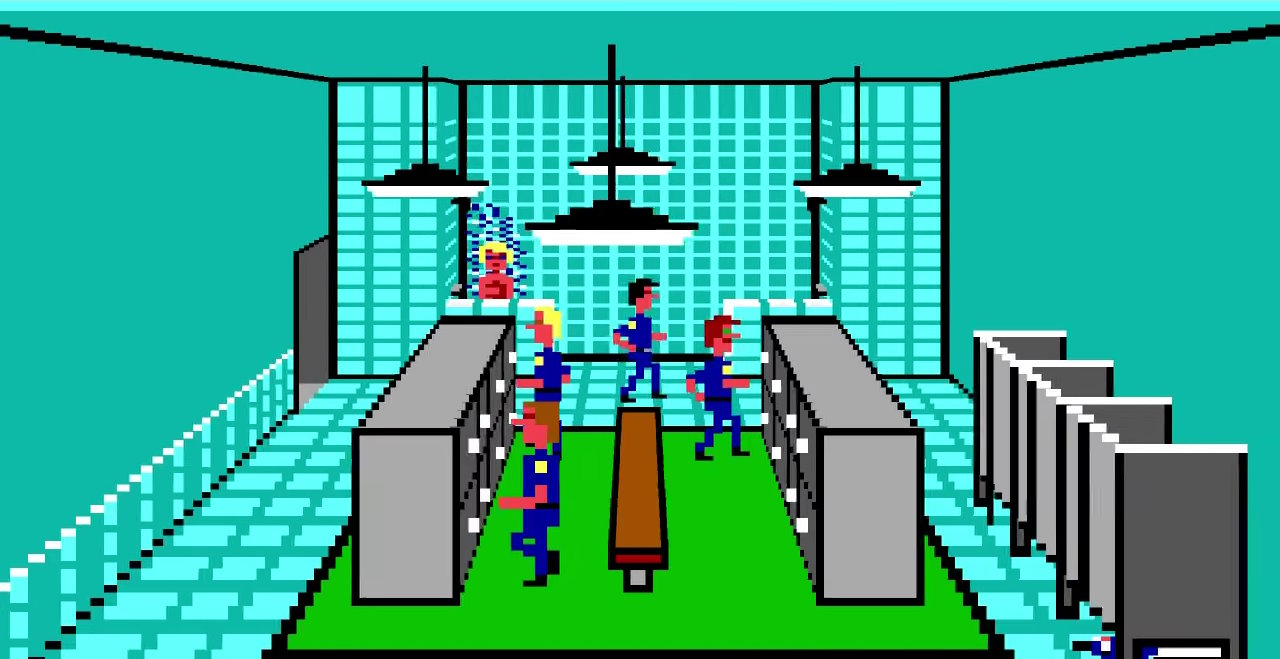
	  <title>Now THIS is the way to remaster old Sierra graphics!</title>
	  <published>2025-03-29T22:58:00+00:00</published>
	  <updated>2025-03-29T22:58:00+00:00</updated>
	  
	  <author>
        <name>James Mackenzie</name>
      </author>
	  
	  
	    <summary>On a recent YouTube binge, I found this incredible example of reimagined Sierra graphics.

Taking Police Quest as inspiration, YouTuber mausimus has created a custom voxel renderer to produce authentic Sierra graphics in true 3D.

It’s very impressive!
</summary>


		<category term="Retrogaming" />
	  
		<category term="Videogames" />
	  
		<category term="Tweets" />


		  <link type="text/html" href="https://twitter.com/jamesfmackenzie/status/1905997972607005028" rel="alternate" />
		  <id>https://twitter.com/jamesfmackenzie/status/1905997972607005028</id>
		  <content type="html">
			<![CDATA[
			  <p><strong>Now THIS is the way to remaster old Sierra graphics!</strong></p>
      
	          <p><p>On a recent YouTube binge, I found this <strong>incredible example of reimagined Sierra graphics</strong>.</p>

<p>Taking Police Quest as inspiration, YouTuber mausimus has created a custom voxel renderer to produce <strong>authentic Sierra graphics in true 3D</strong>.</p>

<p>It’s very impressive!</p>
</p>
	  
			  <p>Read on Twitter <a href="https://twitter.com/jamesfmackenzie/status/1905997972607005028" target="_blank">here</a>.</p>
			  
				<img src="https://www.jamesfmackenzie.com/img/posts/police-quest-sierra-graphics.jpg" alt="featured image" />
			  
			]]>
		  </content>


	</entry>
  
	<entry>
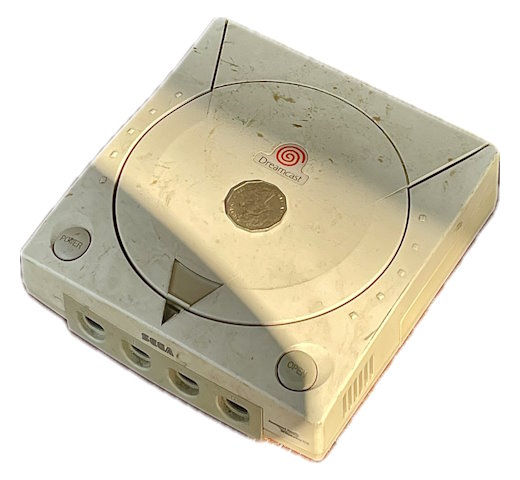
	  <title>This roadside Dreamcast needed a home. Snagged it for $12!</title>
	  <published>2025-03-25T21:15:00+00:00</published>
	  <updated>2025-03-25T21:15:00+00:00</updated>
	  
	  <author>
        <name>James Mackenzie</name>
      </author>
	  
	  
	    <summary>I was recently in Hong Kong and had a very lucky roadside find.

I found a Sega Dreamcast for sale alongside some junk electronics items, and after some haggling was able to pick it up for $12.

No idea if it still works, but for this price it was hard to ignore!
</summary>


		<category term="Retrogaming" />
	  
		<category term="Videogames" />
	  
		<category term="Tweets" />


		  <link type="text/html" href="https://twitter.com/jamesfmackenzie/status/1904522511527846022" rel="alternate" />
		  <id>https://twitter.com/jamesfmackenzie/status/1904522511527846022</id>
		  <content type="html">
			<![CDATA[
			  <p><strong>This roadside Dreamcast needed a home. Snagged it for $12!</strong></p>
      
	          <p><p>I was recently in Hong Kong and had a <strong>very lucky roadside find</strong>.</p>

<p>I found a Sega Dreamcast for sale alongside some junk electronics items, and after some haggling <strong>was able to pick it up for $12</strong>.</p>

<p>No idea if it still works, but for this price it was hard to ignore!</p>
</p>
	  
			  <p>Read on Twitter <a href="https://twitter.com/jamesfmackenzie/status/1904522511527846022" target="_blank">here</a>.</p>
			  
				<img src="https://www.jamesfmackenzie.com/img/posts/roadside-dreamcast.jpg" alt="featured image" />
			  
			]]>
		  </content>


	</entry>
  
	<entry>
	  <title>3 PlayStation 2s, 3 Screens. One awesome Gran Turismo experience!</title>
	  <published>2025-03-08T13:27:00+00:00</published>
	  <updated>2025-03-08T13:27:00+00:00</updated>
	  
	  <author>
        <name>James Mackenzie</name>
      </author>
	  
	  
	    <summary>I found a nice Easter egg in Gran Turismo 3.

With three PlayStation 2s, three copies of the game, and an i-Link hub — you can play in a glorious ultra widescreen, triple monitor mode!

Video linked below.
</summary>


		<category term="Retrogaming" />
	  
		<category term="Videogames" />
	  
		<category term="Tweets" />


		  <link type="text/html" href="https://twitter.com/jamesfmackenzie/status/1898440373455782112" rel="alternate" />
		  <id>https://twitter.com/jamesfmackenzie/status/1898440373455782112</id>
		  <content type="html">
			<![CDATA[
			  <p><strong>3 PlayStation 2s, 3 Screens. One awesome Gran Turismo experience!</strong></p>
      
	          <p><p>I found a <strong>nice Easter egg in Gran Turismo 3</strong>.</p>

<p>With three PlayStation 2s, three copies of the game, and an i-Link hub — you can play in a glorious <strong>ultra widescreen, triple monitor mode</strong>!</p>

<p>Video linked below.</p>
</p>
	  
			  <p>Read on Twitter <a href="https://twitter.com/jamesfmackenzie/status/1898440373455782112" target="_blank">here</a>.</p>
			  
			]]>
		  </content>


	</entry>
  
	<entry>
	  <title>Gran Turismo 3 in ULTRA WIDESCREEN (3 PS2s, 3 Screens!)</title>
	  <published>2025-03-08T08:30:00+00:00</published>
	  <updated>2025-03-08T08:30:00+00:00</updated>
	  
	  <author>
        <name>James Mackenzie</name>
      </author>
	  
	  
	    <summary>New video drop!

Ever wondered what Gran Turismo 3 would look like in ultra widescreen?

In this video, I take GT3 to the next level by running it across three screens — using three PlayStation 2 consoles!

Enjoy!
</summary>


		<category term="Retrogaming" />
	  
		<category term="Videogames" />
	  
		<category term="Videos" />


		  <link type="text/html" href="https://youtu.be/ZSN3Lo_Mv50" rel="alternate" />
		  <id>https://youtu.be/ZSN3Lo_Mv50</id>
	      <content type="html">
			<![CDATA[
			  <p><strong>Gran Turismo 3 in ULTRA WIDESCREEN (3 PS2s, 3 Screens!)</strong></p>
			  
				<p><p>New video drop!</p>

<p>Ever wondered what Gran Turismo 3 would look like in <strong>ultra widescreen</strong>?</p>

<p>In this video, I take GT3 to the next level by running it across three screens — <strong>using three PlayStation 2 consoles!</strong></p>

<p>Enjoy!</p>
</p>
			  
			  <p>View on YouTube <a href="https://youtu.be/ZSN3Lo_Mv50" target="_blank">here</a>.</p>
			  <img src="https://img.youtube.com/vi/ZSN3Lo_Mv50/hqdefault.jpg" alt="YouTube thumbnail" />
			]]>
		  </content>


	</entry>
  
	<entry>
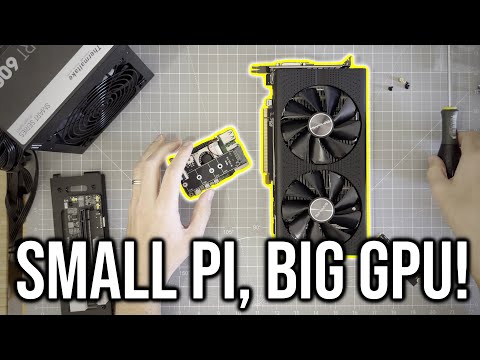
	  <title>I Installed a Modern GPU on Raspberry Pi (and it’s AWESOME!)</title>
	  <published>2024-11-17T11:30:00+00:00</published>
	  <updated>2024-11-17T11:30:00+00:00</updated>
	  
	  <author>
        <name>James Mackenzie</name>
      </author>
	  
	  
	    <summary>Thanks to some driver breakthroughs, I was recently able to get a modern AMD Radeon GPU running on the Raspberry Pi!

Spoiler: it’s really fast.
</summary>


		<category term="Raspberry Pi" />
	  
		<category term="Retrogaming" />
	  
		<category term="Videogames" />
	  
		<category term="Videos" />


		  <link type="text/html" href="https://youtu.be/J0z09Ddr58w" rel="alternate" />
		  <id>https://youtu.be/J0z09Ddr58w</id>
	      <content type="html">
			<![CDATA[
			  <p><strong>I Installed a Modern GPU on Raspberry Pi (and it’s AWESOME!)</strong></p>
			  
				<p><p>Thanks to some driver breakthroughs, I was recently able to <strong>get a modern AMD Radeon GPU running on the Raspberry Pi</strong>!</p>

<p>Spoiler: it’s <strong>really fast</strong>.</p>
</p>
			  
			  <p>View on YouTube <a href="https://youtu.be/J0z09Ddr58w" target="_blank">here</a>.</p>
			  <img src="https://img.youtube.com/vi/J0z09Ddr58w/hqdefault.jpg" alt="YouTube thumbnail" />
			]]>
		  </content>


	</entry>
  
	<entry>
	  <title>How to Install Half-Life 2 on Raspberry Pi</title>
	  <published>2024-10-27T08:35:00+00:00</published>
	  <updated>2024-10-27T08:35:00+00:00</updated>
	  
	  <author>
        <name>James Mackenzie</name>
      </author>
	  
	  
	    <summary>In this guide, we’ll explore how to install Half-Life 2 on the Raspberry Pi, with step-by-step instructions to build your own mini Half-Life machine!
</summary>


		<category term="How To" />
	  
		<category term="Posts" />
	  
		<category term="Raspberry Pi" />
	  
		<category term="Retrogaming" />
	  
		<category term="Videogames" />


		  <link type="text/html" href="https://www.jamesfmackenzie.com/2024/10/27/how-to-install-half-life-2-halflife-2-on-raspberry-pi/" rel="alternate" />
		  <id>https://www.jamesfmackenzie.com/2024/10/27/how-to-install-half-life-2-halflife-2-on-raspberry-pi/</id>
	      <content type="html">
		    <![CDATA[
			  <p><strong>How to Install Half-Life 2 on Raspberry Pi</strong></p>
			  <p><p>In this guide, we’ll explore how to install Half-Life 2 on the Raspberry Pi, with step-by-step instructions to build your own mini Half-Life machine!</p>
</p>
			  
				<p>Read full article <a href="https://www.jamesfmackenzie.com/howto/how-to-install-half-life-2-halflife-2-on-raspberry-pi/" target="_blank">here</a>.</p>
			  
			  
			]]>
		  </content>  
	  
	  
	</entry>
  
	<entry>
	  <title>I Made Half-Life 2 Work on Raspberry Pi!</title>
	  <published>2024-10-19T09:30:00+00:00</published>
	  <updated>2024-10-19T09:30:00+00:00</updated>
	  
	  <author>
        <name>James Mackenzie</name>
      </author>
	  
	  
	    <summary>New video!

It’s common to use Raspberry Pi for home automation or as a media center. But what about something more fun?

After some trial and error, I was recently able to build and play an ARM64 native version of Half-Life 2

Enjoy!
</summary>


		<category term="Raspberry Pi" />
	  
		<category term="Retrogaming" />
	  
		<category term="Videogames" />
	  
		<category term="Videos" />


		  <link type="text/html" href="https://youtu.be/-S_J-3CJsPU" rel="alternate" />
		  <id>https://youtu.be/-S_J-3CJsPU</id>
	      <content type="html">
			<![CDATA[
			  <p><strong>I Made Half-Life 2 Work on Raspberry Pi!</strong></p>
			  
				<p><p>New video!</p>

<p>It’s common to use Raspberry Pi for home automation or as a media center. But what about something more fun?</p>

<p>After some trial and error, I was recently able to <strong>build and play an ARM64 native version of Half-Life 2</strong></p>

<p>Enjoy!</p>
</p>
			  
			  <p>View on YouTube <a href="https://youtu.be/-S_J-3CJsPU" target="_blank">here</a>.</p>
			  <img src="https://img.youtube.com/vi/-S_J-3CJsPU/hqdefault.jpg" alt="YouTube thumbnail" />
			]]>
		  </content>


	</entry>
  
	
</feed>