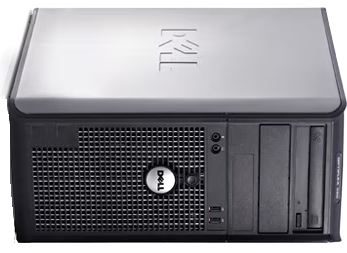
Earlier this year, I wanted a retro PC that could do the full “greatest hits” tour of retro gaming: native DOS, Windows 98, and Windows XP — without spending silly money, without months of hunting for rare parts, and (ideally!) with some modern conveniences like SATA, HDMI/DVI etc.
What I found is right on that knife edge: new enough to absolutely crush late DOS and Win9x games, but old enough to still behave like a proper retro box.
And the best part? These machines are often so unwanted that you can find them for almost the cost of postage.
If you want the broader hardware overview first, see the companion page for the Dell OptiPlex 380.
The idea: stop judging retro builds by the case
When you think “retro gaming PC,” you might picture a tasteful beige tower, maybe a glowing Voodoo logo, and a Sound Blaster peeking out the back.
This build ends with… an ugly Dell OptiPlex.
But here’s the thing: if you focus on the experience instead of the vibes, this class of Core 2-era business desktops can be a great retro bargain:
- Locked 60fps DOS Quake (even in software rendering!)
- Windows 98 gaming with a period-correct, officially supported Radeon
- Windows XP power for early-2000s classics (and yes… even Crysis)
The base machine: Dell OptiPlex 380
I picked up a complete working Dell Optiplex 380 for $60 shipped.
Specs
- Core 2 Duo E7600 @ 3.06GHz
- 4GB DDR3 memory
- 500GB hard disk
- DVD writer
Despite being a business desktop, it has a surprising number of legacy-friendly features:
- Serial port
- Parallel port
- VGA output
Expansion is solid too:
- 1× PCIe
- 2× PCI
Importantly, it’s modern enough that late DOS and Windows 9x titles don’t just run — they fly.
Graphics upgrade: Radeon X800 XL (PCIe)
There’s a common myth that PCIe doesn’t work with Windows 98. Sometimes that’s true depending on the hardware, but in my case it worked perfectly.
I picked up an untested Radeon X800 XL for $12.
The X800 sits in a sweet spot:
- Among the fastest officially supported GPUs for Windows 98
- Still very capable for Windows XP titles
Not bad for twelve bucks!
Unfortunately, the reason it was so cheap became obvious immediately — the fan was seized and made an awful grinding noise. After fixing the fan bearing, the card behaved normally and the system posted fine.

Sound card: Yamaha YMF-724 (real OPL3)
Sound is where many retro builds fall apart, especially for DOS.
Most PCI sound cards don’t behave well for DOS gaming, but Yamaha’s YMF7x4 family is special:
- Real Yamaha OPL3 hardware for authentic FM music
- Excellent DOS compatibility, even on newer systems
- Great Windows 9x support, including XG MIDI
I managed to find an off-brand YMF-724 variant for $10. I had to zoom into the listing photo to confirm what it was — I don’t think the seller had any idea.
At this point, the running total was a cool $82.
Input matters: PS/2 beats USB for DOS
Native DOS apps — and even the Windows 98 installer — can behave badly with USB keyboards and mice on newer systems. Lag, missed input, and outright crashes are common.
Luckily, the OptiPlex has a serial header on the motherboard. Using a Dell add-in bracket, I added proper PS/2 keyboard and mouse support, instantly fixing input issues.

Installing Windows 98: the key BIOS trick
In the BIOS, this machine has an “OS Install” option that limits available memory to 256MB.
That’s perfect for Windows 98 setup, which doesn’t like large amounts of RAM — especially the full 4GB installed here.
With that enabled, the Windows 98 installer behaved perfectly.
Making Windows 98 behave on SATA hardware
Out of the box, Windows 98 would hang during boot on this system.
The fix was applying Rudy Loew’s SATA patch. Without it, the install simply wouldn’t work.
I also slipstreamed LoneCrusader’s Intel chipset INF files, which cleaned up several unknown devices in Device Manager.
Once installed, I added:
- DirectX 9.0c (Windows 98 compatible)
- ATI Catalyst 6.2 drivers for the X800 XL
After one hiccup — removing an extra “Standard Display Adapter” entry from Device Manager — Direct3D was fully working.
Sound in Windows 98: Yamaha goodness
After installing the Yamaha DS-XG drivers and rebooting:
- Windows audio worked perfectly
- The XG General MIDI synth sounded fantastic
- DOS games launched inside Windows worked without issue
Naturally, Doom was the first test — and it worked beautifully.
DOS performance: software rendering at its best
This machine absolutely crushes high-end DOS games:
- Duke Nukem 3D
- Blood
- Quake
- Screamer
Quake in software rendering at 800×600, running at a locked 60fps, is genuinely one of the best-looking DOS experiences I’ve ever seen.
Some DOS titles struggle in DOSBox, but on real hardware like this they behave exactly as intended.
Native DOS sound via Yamaha DSDMA
One of the coolest features of the YMF-724 is DSDMA, which helps emulate the legacy ISA DMA behavior DOS games expect.
Run the setup tool, get valid IRQ/DMA values, and native DOS sound just works.
Wolfenstein 3D sounded exactly right — and because this is real OPL3 hardware, AdLib music is as authentic as it gets.
Some games run too fast, but with CPU throttling tools (like CPUSPD) and cache control, even tricky titles behave well.
Benchmarks (silly fast)
DOS (Phil’s benchmark pack)
- Doom: 216 fps
- Quake: 653 fps
- 3DBench: 1455 fps
Windows 98
- 3DMark 99: 38,612 @ 800×600
- 3DMark 2001: 33,311
- Quake II timedemo: 972.4 fps
- Unreal timedemo: 497.3 fps
Windows XP: finding the ceiling
To see how far this system could stretch, I installed Windows XP.
- Return to Castle Wolfenstein runs at a flawless 60fps even at high resolutions
- Half-Life 2 still looks incredible and runs well, even at 1080p
- Doom 3 runs great on High settings, only struggling at Ultra
- Crysis… yes, it runs 😎
At 800×600, Medium settings, Crysis is genuinely playable — I even got distracted and played through the entire first mission.
Don’t judge a book by its greige cover
As I mentioned already, this miracle machine is an ugly Dell Optiplex 380.
It might not have the classic retro aesthetic, but I’ve grown to love it, because it does something essential: it plays my favourite games from 1990 through 2010 across DOS, Windows 98, and Windows XP, without feeling fragile or precious.
And because it’s cheap, it’s also perfect for experimentation.
What’s next?
I have a Voodoo 3 on order and plan to try native Glide on this retro rocket.
(If you’ve successfully run 3dfx hardware in a similar Core 2 / G41 / OptiPlex setup, I’d love to hear what worked for you!)
Final thoughts
Would you build an ugly retro PC if it meant:
- perfect late-DOS performance,
- excellent Windows 98 gaming,
- and a surprisingly strong Windows XP machine…
…for around $100?
If you try your own OptiPlex sleeper build, let me know what you used for graphics, sound, and memory limits — and whether you ran into any weird compatibility issues.
Sometimes the best retro machines are the ones nobody wants!
Watch on YouTube
I memorialized the full hardware setup and retro journey in video form! Enjoy it here:

