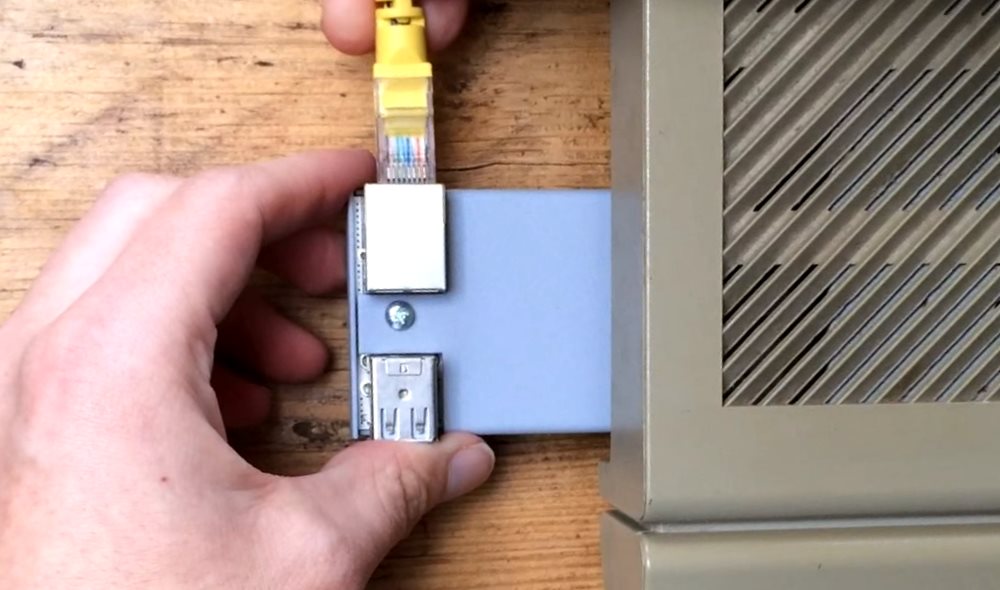
The NetUSBee is an expansion adapter that plugs into the Atari ST’s cartridge port and adds an Ethernet port (and USB). It is, in my experience, the quickest and most convenient way to get files onto an ST — and with the right software it will also put the machine on the network properly.
What it is
The adapter sits in the cartridge port, usually on the left-hand side of the ST, and exposes an RJ45 socket. From there you can connect it to a switch or router, or directly to a PC’s network card.
File transfer
The easy route is a tool called uip-tool (UIPV43.TOS): a single click-and-run program that brings up the network stack and serves a small web interface from the ST itself. You note the IP address it reports, open that address in any browser on your PC, and drag and drop files straight onto the ST’s drives. No separate drivers or TCP/IP stack to install.
Web browsing
With a full setup — TOS Ethernet drivers plus the STinG TCP/IP stack — the ST can also browse the web using Crystal Atari Browser (CAB). It is slow and there is no CSS support, so most of the modern web is out, but simple and older sites do load. Adding an ET4000 graphics card to reach 1024×768 in 256 colours makes the experience noticeably better.
Why I rate it
For getting data onto the machine it is the fastest and least fussy option I have used — faster than a serial cable, and simpler to live with than partitioning an SD card. The fact that the same adapter also enables genuine networking and web access is a bonus that the PARCP-USB and floppy routes cannot match.