The Dell Dimension E520 is a no-frills mid-2000s home PC built around Intel’s G965 platform. It was designed for the Windows XP era, but today it sits in an interesting middle ground for retro gaming: fast enough to brute-force a lot of late DOS and Win9x software, but new enough that older operating systems stop behaving naturally.
I am mostly interested in this machine as a retro gaming platform. The real question is not just what hardware is inside it, but whether it is actually fun and useful for playing older PC games.
For this class of machine, the three main targets are:
- DOS
- Windows 98
- Windows XP
This page is intended as a hardware overview and reference page for the machine itself, with a high-level take on how well it fits those three use cases. For the fuller troubleshooting and test results, see the companion case-study post: I Tried to Turn a Dell Dimension E520 into a Windows 98 Retro PC.
Specifications
Exact configurations vary, but most Dimension E520 systems share the following characteristics:
- Chipset: Intel G965 Express
- Southbridge / I/O controller: Intel
ICH8 - Memory: DDR2-533 or DDR2-667
- Storage: SATA
- Graphics: Intel GMA 3000 onboard
- Expansion: PCI Express x16, PCI Express x1, 2 PCI
- Networking: integrated Ethernet
Like a lot of Dell home systems from this era, the E520 is cheap, common, and visually unremarkable. That is part of the appeal.
My machine
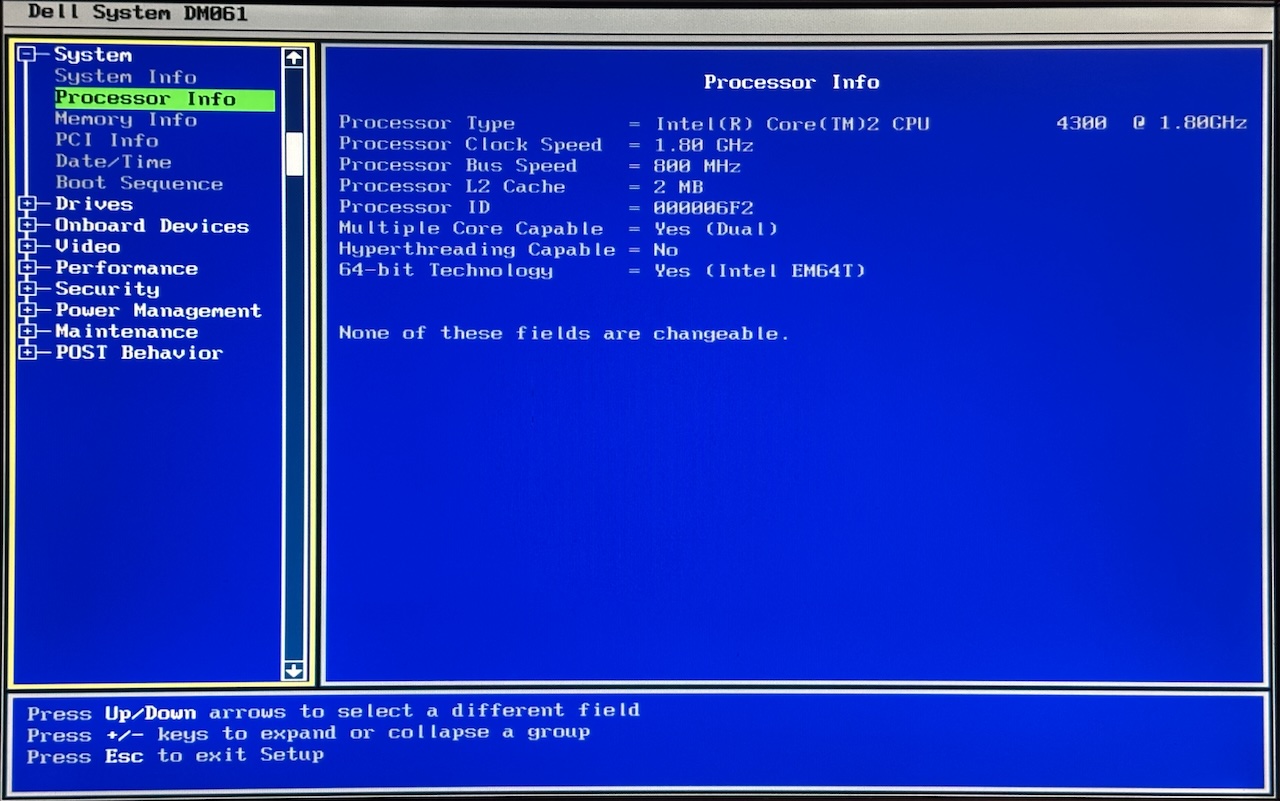
The notes on this page are based on my own Dimension E520 with the following configuration:
- CPU: Intel Core 2 Duo
E4300 @ 1.80GHz - Bus speed: 800MHz
- L2 cache: 2MB
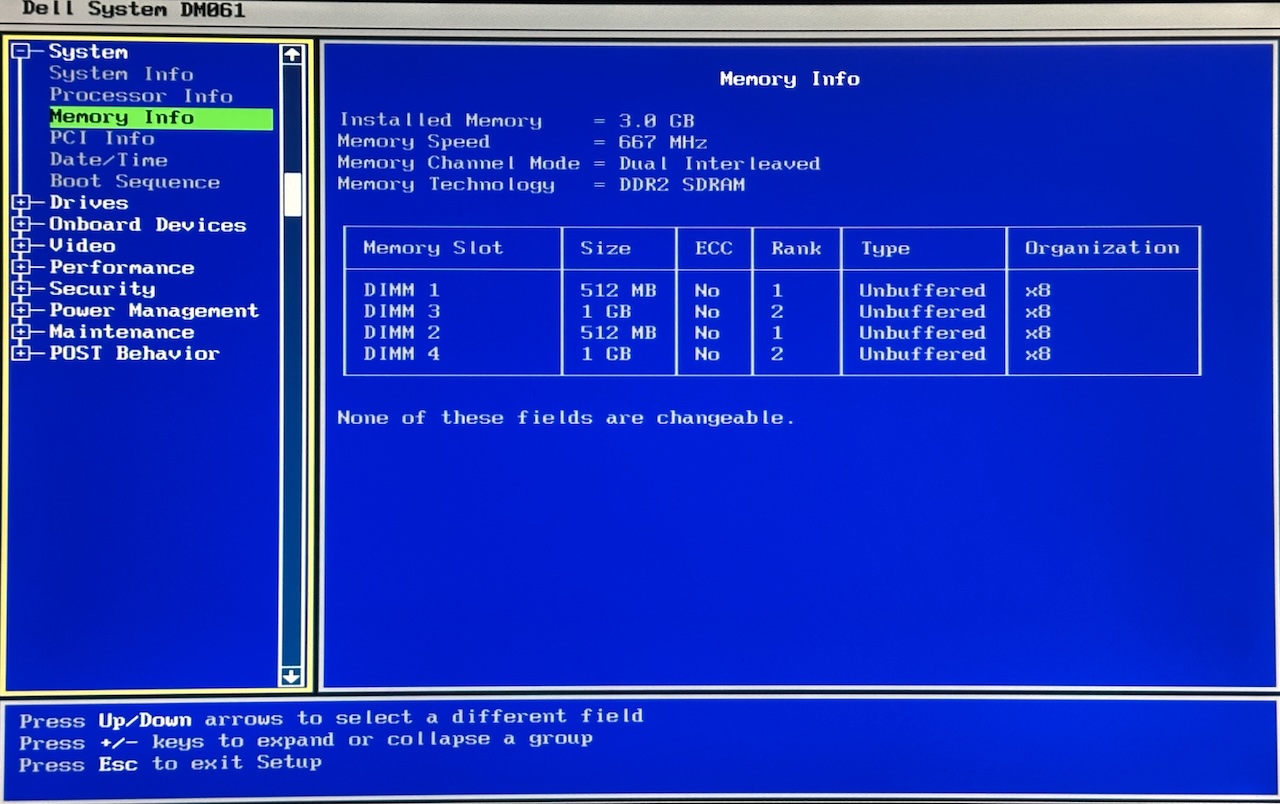
- Memory: 3GB DDR2 at 667MHz
- Memory mode: dual interleaved
- DIMM layout: 512MB in DIMM 1, 1GB in DIMM 2, 1GB in DIMM 3, 512MB in DIMM 4
- Audio: Intel HD Audio with a Sigmatel codec
This is not an exotic build. It is the kind of ordinary office or family PC configuration that still turns up cheaply today.
Chipset and onboard devices
One of the details that matters most for retro testing is the platform makeup:
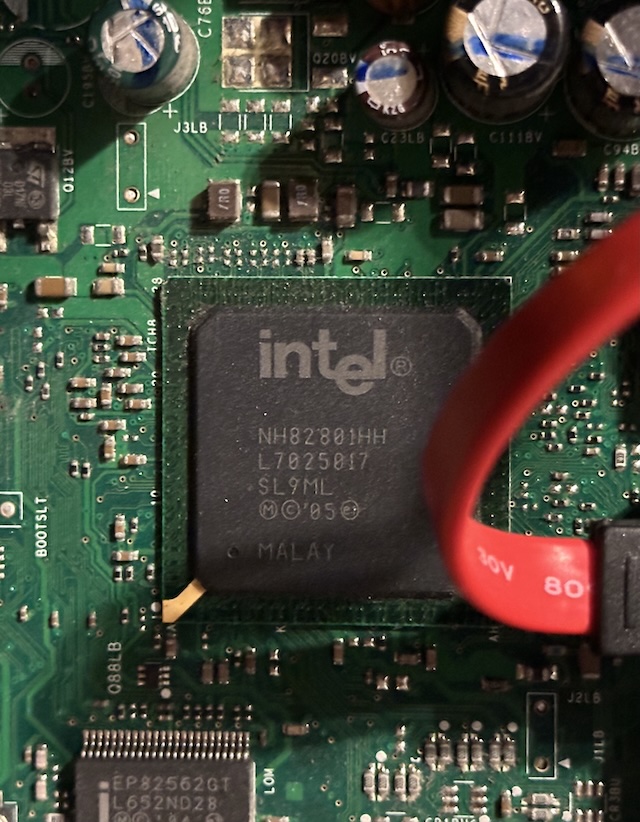
- Chipset: Intel G965 Express
- Southbridge / I/O controller: Intel
ICH8 - Audio: Intel HD Audio with a Sigmatel codec
That later southbridge is a big part of why the machine feels much more natural under Windows XP than it does under Windows 98 or native DOS.
Why the Dimension E520 is interesting for retro builds
The E520 has a few traits that make it genuinely worth trying:
- Core 2-class performance for late DOS and Win9x games
- both PCI and PCIe expansion
- a BIOS OS Install option that limits RAM to 256MB
- SATA storage that can be made usable under Windows 98 with patches
That RAM-limiting feature matters a lot. Too much memory is one of the easiest ways to make Windows 98 setup painful on newer systems.
The machine is also awkward in some very specific ways:
- Intel
ICH8was never designed with Windows 98 in mind - there are no native PS/2 or serial ports on the rear I/O
- disk access and PCIe graphics behaviour become much less predictable under Win98
- DOS input and sound are possible, but not effortless
High-level retro gaming verdict
At a high level, the Dimension E520 feels like this:
- DOS: interesting, but compromised
- Windows 98: possible, but temperamental
- Windows XP: the natural fit
That split is really the story of the machine. The E520 is powerful enough to be appealing, but it sits right on the boundary where Win98 and DOS stop being comfortable.
Expansion slots
The Dimension E520 offers reasonable expansion for its era:
- 2 PCI slots
- 1 PCI Express x1 slot
- 1 PCI Express x16 slot
This allows for:
- a discrete PCIe graphics card
- PCI sound cards or I/O expansion
However, not all PCIe GPUs behave well under Windows 98 on this platform.
BIOS features that matter
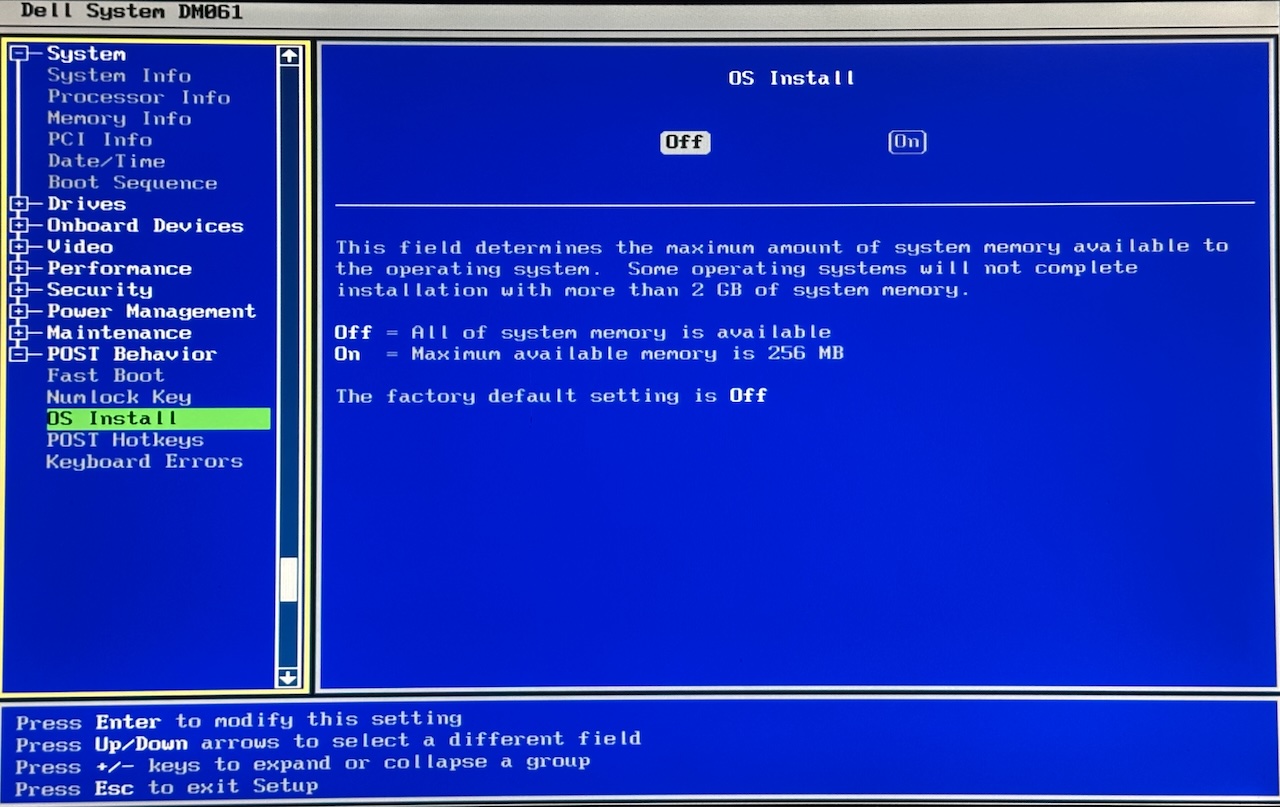
Like several Dell systems of this era, the E520 BIOS includes an OS Install option.
When enabled, this limits available system memory to 256MB, which is extremely useful for:
- installing Windows 98
- avoiding early setup crashes on high-RAM systems
This feature is one of the E520’s biggest advantages for retro experimentation.
Input and legacy caveats
One of the platform’s more annoying traits is its lack of legacy input options:
- no native PS/2 ports
- no native serial port on the rear I/O
That matters because USB keyboards can be laggy or unreliable in DOS on some Dell systems from this era.
The motherboard does appear to include solder pads for a serial or PS/2 header, but that remains more of an experimental path than a solved convenience.
Storage and controller behaviour
SATA support is one of the reasons the E520 is attractive in the first place, but it is also one of the reasons Windows 98 becomes awkward.
In practice, this is not a machine where you should expect stock Win98 disk behaviour. It is a machine where patches and workarounds are part of the plan from the start.
Windows 98
High-level take: possible, but not naturally friendly.
Pros:
- BIOS RAM-limiting mode makes setup easier
- SATA storage can be made usable with the right patching
- PCI plus PCIe expansion makes experimentation interesting
- Voodoo 2 results look more promising here than on the OptiPlex 760
Cons:
- post-install disk behaviour can still be unstable
- PCIe Radeon cards do not behave as cleanly as they should
- onboard audio remains a weak point
- this is still a machine that needs patches and compromise
DOS
High-level take: viable, but with caveats.
Pros:
- plenty of CPU performance for demanding DOS games
- VBE and software-rendered DOS games are an easy win
- PCI slots leave room for sound-card experiments
- SBEMU gives a practical fallback for sound
Cons:
- USB keyboard behaviour can be laggy or buffered
- no easy built-in PS/2 fallback
- native DOS digital audio is still limited by the later chipset design
Windows XP
High-level take: this is where the machine makes the most sense.
Pros:
- hardware generation lines up well with XP
- stable storage and chipset support
- much less drama around graphics and audio
- enough performance for a wide range of early-2000s games
Cons:
- less unusual than the Windows 98 and DOS angle
- if XP is your only goal, there are many other Core 2 machines that will do the job
Why it stands out
What makes the E520 interesting is not that it is perfect. It is that it combines a few genuinely useful retro-friendly traits with a few very modern-for-Win98 headaches.
That makes it a good machine for experimentation, and a much better machine for a hybrid DOS and XP build than for a simple, low-drama Windows 98 setup.
Learn more
A case-study write-up on what worked, what failed, and why the E520 ended up being more convincing as a hybrid machine than as a simple Win98 build:

