High-quality capture of classic computers is often associated with external scalers like the RetroTINK or Framemeister. These devices are excellent, but they’re not the only way to achieve sharp, native-resolution results.
In this post, I document an alternative approach: capturing raw RGB video directly into a PC capture card and using careful post-processing to reconstruct the original pixel grid.
With the right workflow, it’s possible to get extremely sharp, accurate Atari ST video — even without a dedicated scaler in the signal chain.
The Idea: Replace the Scaler with Post-Processing
A scaler performs three key jobs:
- Samples the analogue signal
- Determines the active image area
- Scales the image cleanly to a modern resolution
In this setup, those steps are split:
- Sampling is handled by a high-quality capture card
- Scaling and framing are done explicitly in software
- Pixel integrity is preserved by using only controlled, integer operations
The end result is video that is:
- True to original source resolution (i.e. “native resolution”)
- Free from blur and ringing
- Suitable for modern video platforms (e.g. 1080p50, 1080p60)
Hardware Used
For my example, I’m using an original Atari ST, which has a native resolution of 320×200. But this process can work equally well for other classic computers and consoles.
The following hardware was used to capture RGB output:
- Atari Mega ST
- Atari ST RGB SCART cable (Retro Computer Shack)
- ArcadeForge Sync Strike
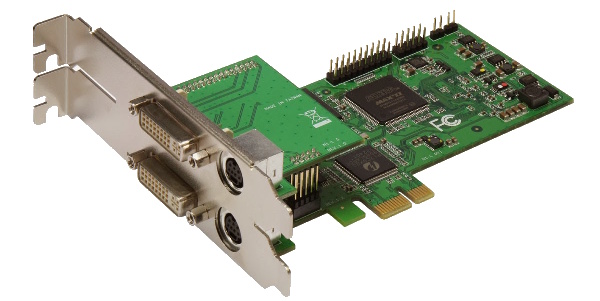
- Micomsoft SC-512N1-L/DVI Component HD and DVI Capture Card
The Sync Strike extracts clean sync from the ST’s RGB output, while the Micomsoft card allows precise sampling of low-resolution analogue video without enforcing its own scaling or filtering.
Software Used
All capture and processing was done using free, well-established PC software:
AmaRecTV was used to capture uncompressed video. VirtualDub was then used to perform deliberate, step-by-step scaling to recover the original pixel structure.
Capture & Processing Workflow
This is the exact workflow used to go from raw analogue RGB to clean, native-resolution output:
- Capture uncompressed video in AmaRecTV at:
- 288p50
- 720 pixels per line sampled
- Upscale to 1280×288 using Lanczos3
- Increases horizontal precision prior to cropping
- Crop to 960×200
- Isolates the active Atari ST display area
- Divide width by 3 using Nearest Neighbour
- Restores the original 320×200 pixel grid
- Multiply width and height by 5 using Nearest Neighbour
- Produces 1600×1000 with perfect integer scaling
- Frame into 1920×1080 (1080p50)
- Modern-friendly output without fractional scaling
- Compress using H.264
After step 3, all scaling is integer-only. No filtering or resampling is applied to the source pixels.
Why This Works
The Atari ST outputs a low-resolution signal that doesn’t map cleanly to modern display standards. By oversampling horizontally during capture and deferring scaling decisions to software, it becomes possible to:
- Recover exact pixel boundaries
- Avoid analogue softness
- Control every scaling step explicitly
This approach effectively replaces what a hardware scaler would normally do — but with full transparency and repeatability.
Example Captures
Below are three example captures produced using this workflow. Each is raw reference footage embedded from unlisted YouTube uploads.
Atari ST GEM Desktop
The GEM desktop is ideal for evaluating:
- Line sharpness
- Font clarity
- Pixel alignment
Loom (Lucasfilm Games)
Loom highlights:
- Dithered gradients
- Fine pixel detail
- Colour transitions that benefit from clean sampling
Xenon 2 (Bitmap Brothers)
Xenon 2 is a good stress test, demonstrating:
- High-contrast pixel art
- Fast scrolling
- Stable 50 Hz motion
Final Thoughts
External scalers remain a great solution, especially for live use and multi-system setups. However, if your goal is archival, documentation, or educational capture, a scaler is not strictly required.
With a good capture card and careful post-processing, it’s entirely possible to produce native-resolution Atari ST video that is sharp, accurate, and faithful to the original hardware.
Hopefully this approach is useful to anyone looking to capture classic systems without additional scaling hardware.

