The Dell OptiPlex 380 is an unassuming late-2000s business desktop, but for retro PC builders it occupies a very interesting sweet spot. Cheap, widely available, and just old enough to retain key legacy features, it can be turned into a surprisingly capable DOS, Windows 98, and Windows XP gaming machine with the right approach.
I am mostly interested in this machine as a retro gaming platform. The real question is not just what hardware it shipped with, but whether it is actually fun and useful for playing older PC games.
For this class of machine, the three main targets are:
- DOS
- Windows 98
- Windows XP
This page is intended as a hardware overview and reference page for the machine itself, with a high-level take on how well it fits those three use cases. For the fuller build story, see the linked blog post and project page below.
Why the OptiPlex 380 is interesting for retro builds
On paper, the OptiPlex 380 doesn’t look like a retro machine at all. But dig a little deeper and several useful traits emerge:
- Core 2–era performance that completely overwhelms late DOS and Win9x games
- Genuine legacy I/O still present (VGA, serial, parallel)
- Both PCI and PCI Express expansion
- A BIOS feature that can limit RAM to 256MB, ideal for Windows 98 setup
- SATA storage that can be made Windows 98–friendly with patches
- Extremely low cost and easy availability on the second-hand market
It’s a classic example of a machine that makes more sense when judged by capability, not appearance.
Specifications
Exact specifications vary by configuration, but most OptiPlex 380 systems share the following baseline:
- CPU: Intel Core 2 Duo (commonly E7xxx or E8xxx series)
- Chipset: Intel G41 with ICH7 southbridge
- Memory: DDR3 (officially supported up to 4GB)
- Storage: SATA hard drive or SSD
- Optical: DVD-ROM or DVD-RW
- Graphics: Intel GMA X4500 (onboard)
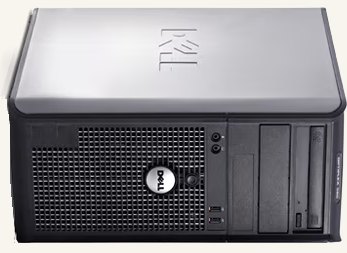
The OptiPlex 380 was sold in desktop and small-form-factor (SFF) cases.
The desktop version is strongly preferred for retro builds due to better expansion and cooling options.
High-level retro gaming verdict
At a high level, the OptiPlex 380 feels like this:
- DOS: excellent
- Windows 98: unusually good for hardware this new
- Windows XP: completely at home
That is what makes the machine so appealing. It is rare to find a cheap PC that can cover all three eras this convincingly.
Expansion slots (important for retro use)
One of the OptiPlex 380’s biggest strengths is its slot layout:
- 1× PCI Express x16
- 2× PCI
This allows for:
- A capable PCIe graphics card for Windows 98 and Windows XP
- A PCI sound card with better DOS compatibility than onboard audio
Despite common assumptions, PCIe graphics cards can work under Windows 98 on this system when paired with a compatible GPU and drivers.
Rear I/O and legacy ports
Unlike many newer systems, the OptiPlex 380 retains genuinely useful legacy connectivity:
- VGA output
- Serial (COM) port
- Parallel (LPT) port
- USB 2.0
- Ethernet
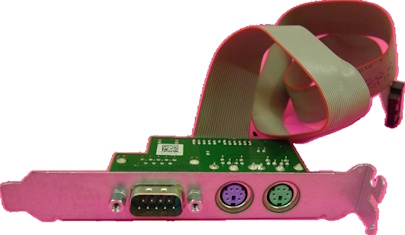
- PS/2 support (via motherboard header and optional bracket)
For DOS and early Windows installations, this is a major advantage — particularly when USB input proves unreliable.
BIOS features that matter
The BIOS on the OptiPlex 380 is unusually accommodating for retro experimentation.
OS install mode (RAM limiting)
A standout feature is the OS Install option, which temporarily limits available system memory to 256MB.
This is particularly useful for:
- Installing Windows 98
- Avoiding early setup crashes or protection errors
- Simplifying Win9x compatibility on systems fitted with multiple gigabytes of RAM
After installation, you can either remain capped or apply third-party RAM patches.
SATA behaviour
The BIOS exposes SATA drives in a way that can work with Windows 98 once appropriate patches are applied — something many later systems fail at entirely.
Windows 98 compatibility overview
Out of the box: No
With patches and add-in cards: Yes, very usable
Key points:
- No official Intel G41 Windows 98 drivers (expected)
- Requires:
- A SATA patch (such as rloew’s)
- Third-party chipset INF files
- Onboard graphics are unsuitable for Win9x
- Best results are achieved with ATI Radeon X600 to X850–era PCIe cards
- Excellent Windows 98 gaming performance once configured
In practice, Windows 98 works well on this system if you treat it as a retro platform, not a stock late-2000s PC.
DOS compatibility (the reality)
DOS support on post-ICH5 chipsets is always a compromise, and the OptiPlex 380 is no exception.
What works well
- DOS games that rely primarily on:
- CPU performance
- VESA graphics modes
- FM synthesis music (OPL)
- Late DOS titles that can struggle in DOSBox often perform extremely well here
Sound considerations
The ICH7 southbridge does not support DDMA or PC/PCI, which rules out many PCI sound cards for native DOS digital audio.
What does work well:
- Yamaha YMF7x4 PCI sound cards (724, 744, 754)
- Genuine OPL3 FM synthesis
- DSDMA support
- Excellent compatibility for DOS music and sound effects
ISA sound cards are not an option on this platform.
Windows XP compatibility
Windows XP is where the OptiPlex 380 feels completely at home:
- Full chipset and storage driver support
- Broad PCIe GPU compatibility
- Stable onboard audio
- Strong performance for early-to-mid-2000s games
It comfortably handles titles such as:
- Return to Castle Wolfenstein
- Half-Life 2
- Doom 3
With reduced settings, it can even stretch to more demanding games from the era.
Known quirks and gotchas
- USB keyboards and mice can be laggy or unreliable in DOS
PS/2 input is strongly recommended - Some PCIe GPUs, particularly certain Radeon X600 variants, appear incompatible
- Native DOS sound support is limited by chipset design
- Small-form-factor cases severely restrict GPU choice and cooling
None of these are deal-breakers — they simply require planning.
DOS
High-level take: excellent.
Pros:
- huge CPU headroom for demanding DOS games
- strong software-rendered DOS performance
- workable sound card options if you choose carefully
- much nicer with proper PS/2 input
Cons:
- still no ISA slots
- native DOS digital audio depends heavily on choosing the right PCI sound card
Windows 98
High-level take: much better than this hardware generation has any right to be.
Pros:
- BIOS RAM-limiting mode makes setup far easier
- SATA storage can be made workable
- PCIe Radeon options give strong late Win98 performance
Cons:
- still needs patches and manual setup
- some GPUs are misleadingly incompatible
- not a stock plug-and-play Win98 machine
Windows XP
High-level take: effortless.
Pros:
- hardware generation aligns very well with XP
- broad GPU support
- fast enough for a wide range of early-2000s games
Cons:
- the XP story is less unusual than the DOS/Win98 angle
Why it stands out
What makes the OptiPlex 380 special is not any single specification. It is the combination:
- strong DOS performance
- genuinely workable Windows 98 setup
- easy Windows XP capability
- low cost and high availability
That makes it a rare “one ugly box does almost everything” retro PC.
Who is the OptiPlex 380 for?
This system is ideal if you want:
- A cheap and widely available retro base system
- Strong late DOS and Windows 98 performance
- A single machine that also excels at Windows XP
- A platform that encourages experimentation without fear
It is not ideal if you need:
- ISA expansion
- Perfect Sound Blaster 16–style DOS compatibility
- A completely configuration-free experience
Summary
The Dell OptiPlex 380 is a great example of a system that becomes interesting only once you stop judging it by its original purpose. With a few smart upgrades, it can span nearly two decades of PC gaming, all while costing less than many single “retro” components.
Ugly? Absolutely.
Capable? Without question.
Learn more
-
The Ugly Dell That Became My Dream Retro Gaming PC
The full build story, benchmarks, parts choices, and why this cheap office machine became such a satisfying retro PC. -
Building a Retro Rocket PC on the Cheap
The project summary page with the overall goal, outcome, and video link.