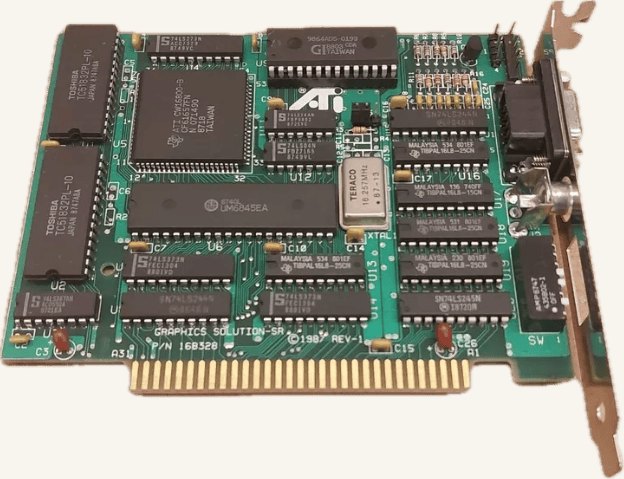
I picked up an ATI Graphics Solution SR to solve a very specific problem on my Amstrad PC1640: the built-in Paradise graphics chip can do CGA and EGA colour just fine, but the bundled PC-MD monitor is monochrome-only. This 1987 card’s whole trick is emulating CGA output on that monochrome monitor, so I could keep the original monitor and still play colour games.
What it does
It’s ATI’s enhanced take on the CGA and Hercules standards, with DIP switches to pick the mode:
- full CGA compatibility (graphics and text modes)
- Hercules compatibility (720×348 monochrome)
- MDA emulation for standard monochrome displays
- CGA-on-MDA emulation — the party trick, mapping CGA’s colour palette to interlaced grayscale on a mono monitor
Getting it working
On the PC1640 I had to disable the onboard graphics chip via motherboard DIP switches (SW10 = On, SW6/SW7 = Off, On) before the card would take over, then set the Graphics Solution SR itself to CGA emulation mode (SW1, SW2 = Off, Off; SW3, SW4, SW5 = On, Off, Off). Full steps and the switch reference are in CGA Gaming on an MDA Monochrome Monitor.
My take
It works, and it’s a genuinely neat trick — the grayscale output looks noticeably richer than plain Hercules black-and-white. The catch is flicker: the interlaced mode the card uses to fake CGA on a mono display is visibly flickery, so it’s more of a novelty than something you’d want to stare at for hours. ATI’s own Small Wonder Graphics Solution does the same CGA-on-mono trick, and the EGA Wonder extends it to EGA colour — which is the one I’m hunting down next.
Pros
- lets you play colour CGA games on a monitor that was never meant to show colour
- switchable between CGA, Hercules, and MDA modes via DIP switches
- grayscale output is richer than standard Hercules mono
Cons
- interlaced CGA-on-MDA mode has noticeable flicker
- configuration is all DIP switches — no software setup
- a fairly obscure card now, so documentation takes some digging
