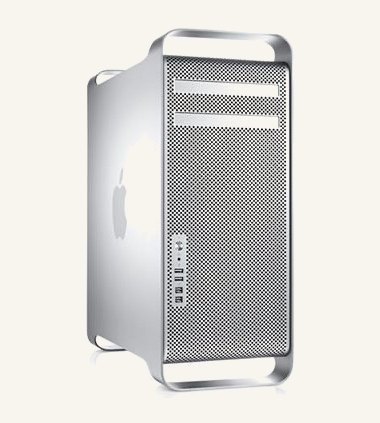
I bought a 14-year-old Mac Pro 5,1 off eBay and tricked it out with modern graphics, SSD storage, and 48GB of RAM — full story in I Supercharged This Old Mac for AAA Gaming. It’s Apple’s 2010–2012 “cheese grater” tower workstation, and what makes it worth the effort is how modular it still is: CPUs, GPU, storage, and even the OS itself are all genuinely upgradeable, decades later.
What it is
- CPU: dual-socket Intel Xeon 5500/5600 series, up to 12 cores total
- Memory: DDR3 ECC, 4 channels per CPU, up to 128GB across 8 slots
- Storage: SATA HDD/SSD, plus optional PCIe storage cards
- Graphics: AMD or NVIDIA PCIe GPUs
- Expansion: 4× PCIe 2.0 slots (2 double-width, 2 single-width)
- Networking: dual Gigabit Ethernet, optional Wi-Fi/Bluetooth
- Power: 980W or 1200W depending on configuration
With firmware updates it officially supports macOS from 10.6 Snow Leopard up to 10.13 High Sierra — and unofficially, much further; see my upgrade guide for how far you can actually push it.
Why I like it
- genuinely user-serviceable — RAM, GPU, storage, and CPUs are all swappable
- the tower design keeps cooling effective and noise reasonable even under load
- firmware updates keep unlocking newer OS support well past what Apple originally intended
- flexible enough to be a modern-ish workstation, a retro/emulation box, or both
My take
The Mac Pro 5,1 earns its keep by being useful for more than one thing at once. It handles real creative workloads — Final Cut, Logic Pro, 3D rendering — but it’s just as much fun as a retro and emulation platform: classic Mac OS through VMs, legacy macOS versions for old software, GPU-accelerated emulation, even Boot Camp for cross-platform builds. Deciding exactly how far to push the OS and GPU choices is its own rabbit hole — that’s what the upgrade guide is for.
Pros
- properly upgradeable — this isn’t a sealed modern Mac
- strong cooling and quiet running for a machine with this much CPU headroom
- long OS support tail thanks to firmware unlocks and OpenCore
- flexible enough for creative work, a retro hub, or a Boot Camp Windows box
Cons
- big and heavy — this is a tower, not a compact desktop
- power-hungry, especially in dual-CPU configurations
- newer GPUs often need boot tweaks to behave
- limited USB 2.0/3.0 ports on the board itself; PCIe expansion fills the gap
